Nutrition Tracker · 300K+ foods · 22 micronutrients
Track every macro.
Plus 22 micronutrients.
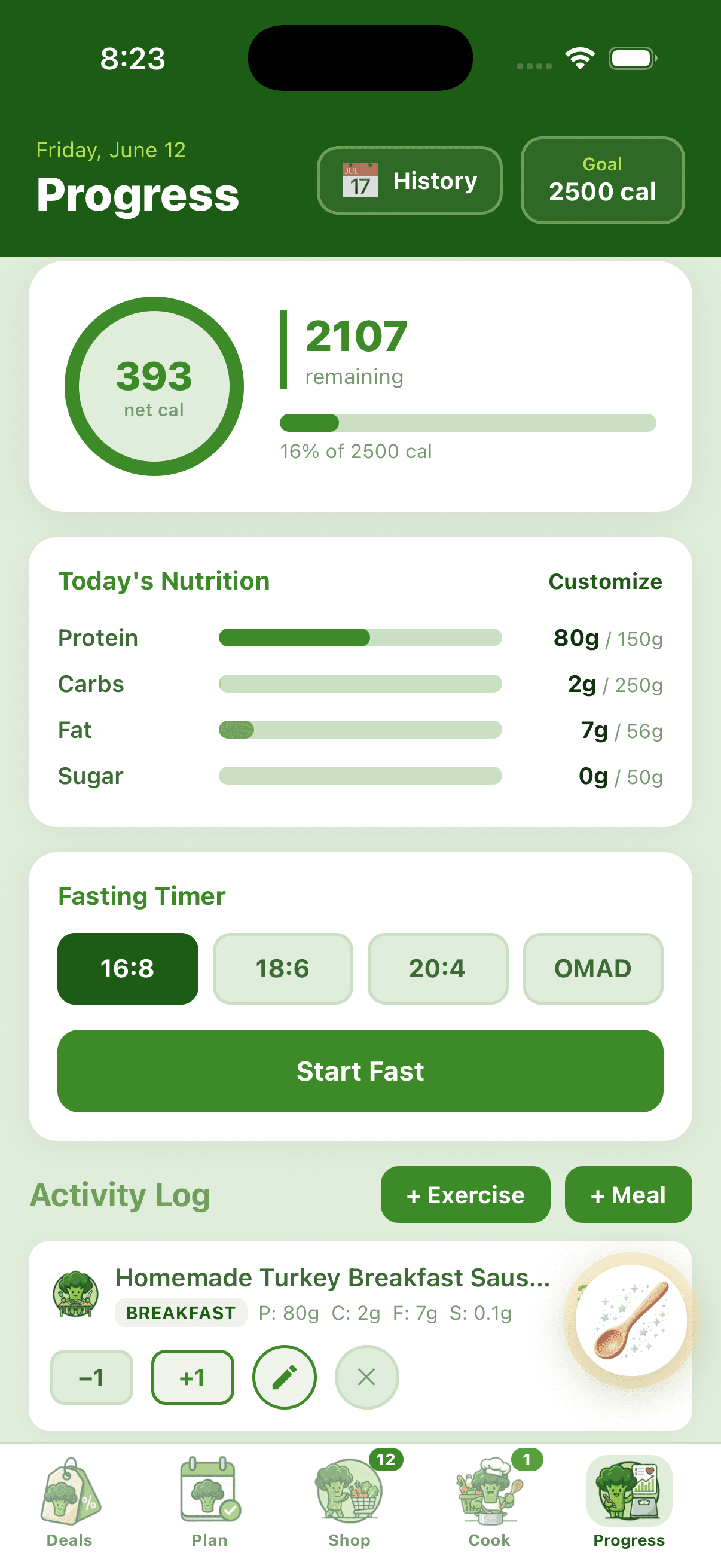
Calories, protein, carbs, fat, sugar — and the 22 micronutrients most apps ignore. Powered by 300,000+ foods from USDA FoodData Central, with Apple Health and Health Connect sync built in.
14-day free trial · Unlimited food logging
What we track
Macros + the things most apps ignore.
Macros
The basics — visualized as bars against your goals.
Calories
Net calc with exercise burn
Protein
Grams + % of daily goal
Carbs
Total + per-meal breakdown
Fat
All types tracked
Sugar
Added and natural
Fiber
Optional, off by default
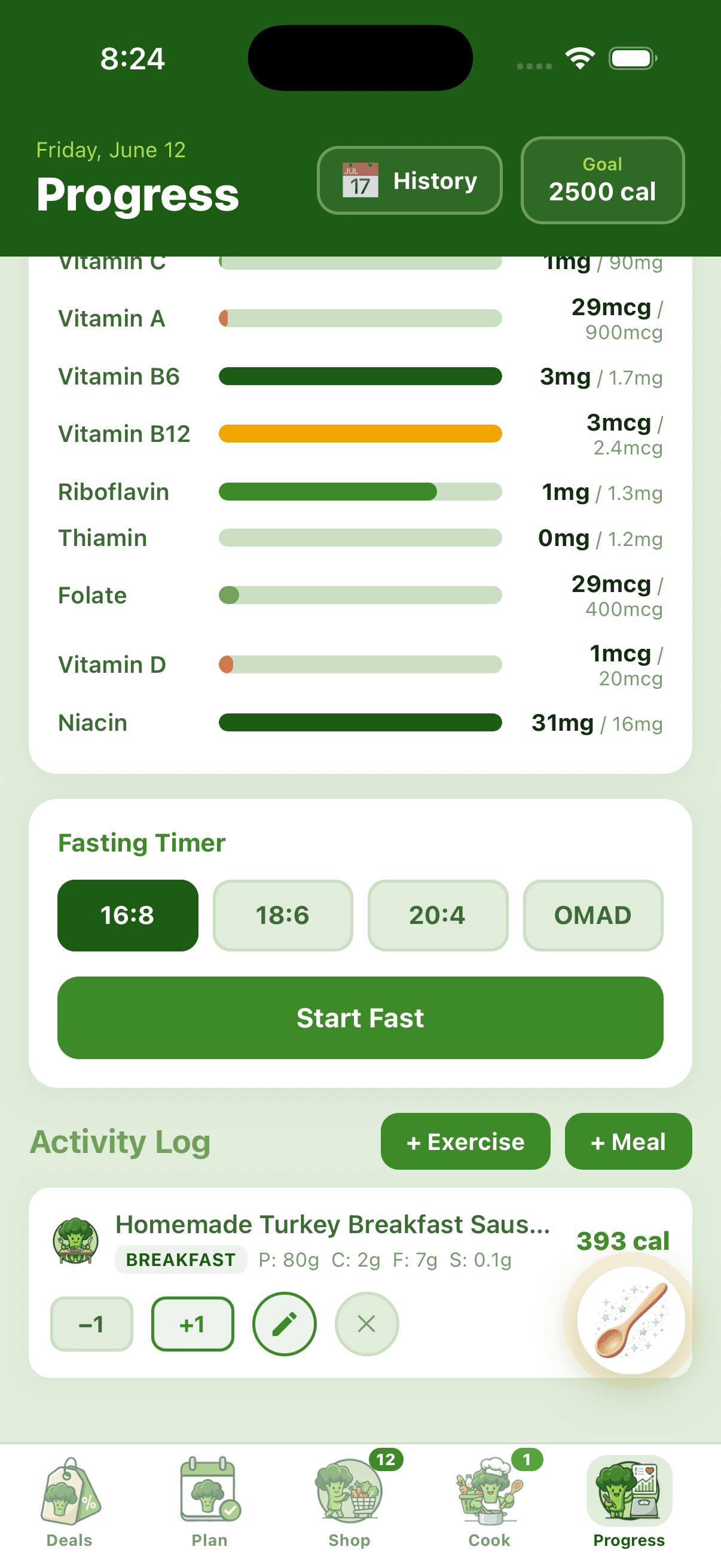
22 micronutrients
All tracked automatically from USDA. Customize which ones show in the daily view.
How meals get logged
Four paths in. Same accuracy out.
USDA FoodData Central
300,000+ branded and generic foods. Type "McDonald's cheeseburger" or "raw chicken breast" and we pull full nutrition with all 22 micronutrients populated.
Barcode scan
Scan any product to log it. Falls back to Open Food Facts (2M+ products) if a barcode isn't in USDA.
Auto from cooked recipes
Finish a recipe in Cook Mode and the meal logs automatically with all 22 micronutrients folded into your daily total. No double-entry.
Apple Health + Health Connect
Two-way sync with your phone's health platform. We write meals to Apple Health / Health Connect and pull in entries from other apps, with de-duplication so nothing double-counts.
Inside the tracker
Built for both daily logging and a quarterly look-back.
Calorie ring with color states
Green under 70% of your goal, yellow 70-90%, red over 90%. Shows net calories (eaten minus burned) with a breakdown card when you've logged exercise.
30-day backfill
Tap any day on the History calendar to log past meals. Forgot Tuesday's lunch? Add it Wednesday and the daily total updates.
Customize which nutrients you track
Don't care about vitamin K? Hide it. Care a lot about iron? Pin it to the top. Tracking is opinionated by default, customizable when you need it.
150+ exercises with personalized burn
Pick from Cardio, Strength, Sports, Water, Flexibility. Burn rates scale to your weight — running an 8-min/mile pace burns different calories at 150lb vs 200lb.
Branded food search
Eating out? Search "Chipotle chicken bowl" or "Starbucks grande latte" — the branded entries come pre-populated with calories, macros, and most of the micronutrients.
Portion stepper on every meal
Ate 1.5 servings instead of 1? Tap +1 to duplicate, -1 to undo. Two-tap adjustments without re-entering the meal.
Why this isn't another MyFitnessPal
Macros are table stakes. We go further.
MyFitnessPal counts calories. Cronometer counts micros but the UI fights you. BiteCaddy counts both AND lives inside the planning + cooking loop — so logging is mostly automatic.
When you finish cooking a recipe, the meal logs itself with all 22 micronutrients. When you log exercise, the calorie ring updates with net burn. When you sync with Apple Health, BiteCaddy de-duplicates entries from other apps so nothing double-counts.
Other apps
- ✕ MyFitnessPal: 4 macros + ads
- ✕ Cronometer: 22 micros but no meal plan
- ✕ LoseIt: macros only, no recipe integration
BiteCaddy
- ✓ Macros + 22 micronutrients
- ✓ Auto-logs from cooked recipes
- ✓ 300K+ USDA foods, no user-submitted noise
- ✓ Apple Health + Health Connect de-duped
FAQ
Quick answers
How is this different from MyFitnessPal?
Three differences: (1) we track 22 micronutrients per meal automatically, not just calories and 4 macros; (2) the food database is USDA FoodData Central, not user-submitted entries with mystery accuracy; (3) we live inside a meal-planning + grocery deal loop, so the meals you log are the ones you cooked from BiteCaddy plans.
Where do the micronutrient values come from?
USDA FoodData Central. Every food in the USDA Foundation Foods dataset has values for all 22 micronutrients we track. Branded foods inherit micros where the manufacturer reports them; we use category-level fallbacks otherwise.
Does it sync with Apple Health?
Yes, with two-way sync. Every meal you log writes to Apple Health (iOS) or Health Connect (Android). Entries from other apps (your watch, MyFitnessPal, Fitbit, Samsung Health, etc.) flow in and are de-duplicated so nothing double-counts toward your daily totals.
What about exercises?
150+ exercises across Cardio, Strength, Sports, Water, and Flexibility. Burn rates scale to your logged weight. Manual Entry option too if you want to log a custom workout with a known calorie burn.
Can I backfill missed days?
Yes — up to 30 days back. Tap any date on the History calendar in the Progress tab and log meals or exercises as if it were today.

Know what you ate. Down to the micronutrient.
Track macros, all 22 micros, and exercise — all powered by USDA.
Start free trialNo credit card to start · Cancel anytime